Part 1: Building an MCP RAG Server with FastAPI, Pinecone, and OpenAI
Create a modular Retrieval-Augmented Generation server powered by the Model Context Protocol (MCP) for dynamic AI tool discovery and knowledge retrieval.
Introduction
In this project, we're building an MCP RAG Server — a modular Retrieval-Augmented Generation service exposed via the Model Context Protocol (MCP).
The server's RAG layer contains curated academic content:
- Research summaries
- Study guides and reference notes
- Exam preparation materials
Overall Purpose
To create a self-describing, reusable knowledge retrieval service that any MCP-compatible AI agent can consume without custom API integrations.
A key part of this setup is generating and validating rag_mcp_tools.json. This file acts as a contract between your RAG server and AI clients, ensuring consistent tool discovery, correct input/output schemas, and seamless integration with MCP-enabled agents.
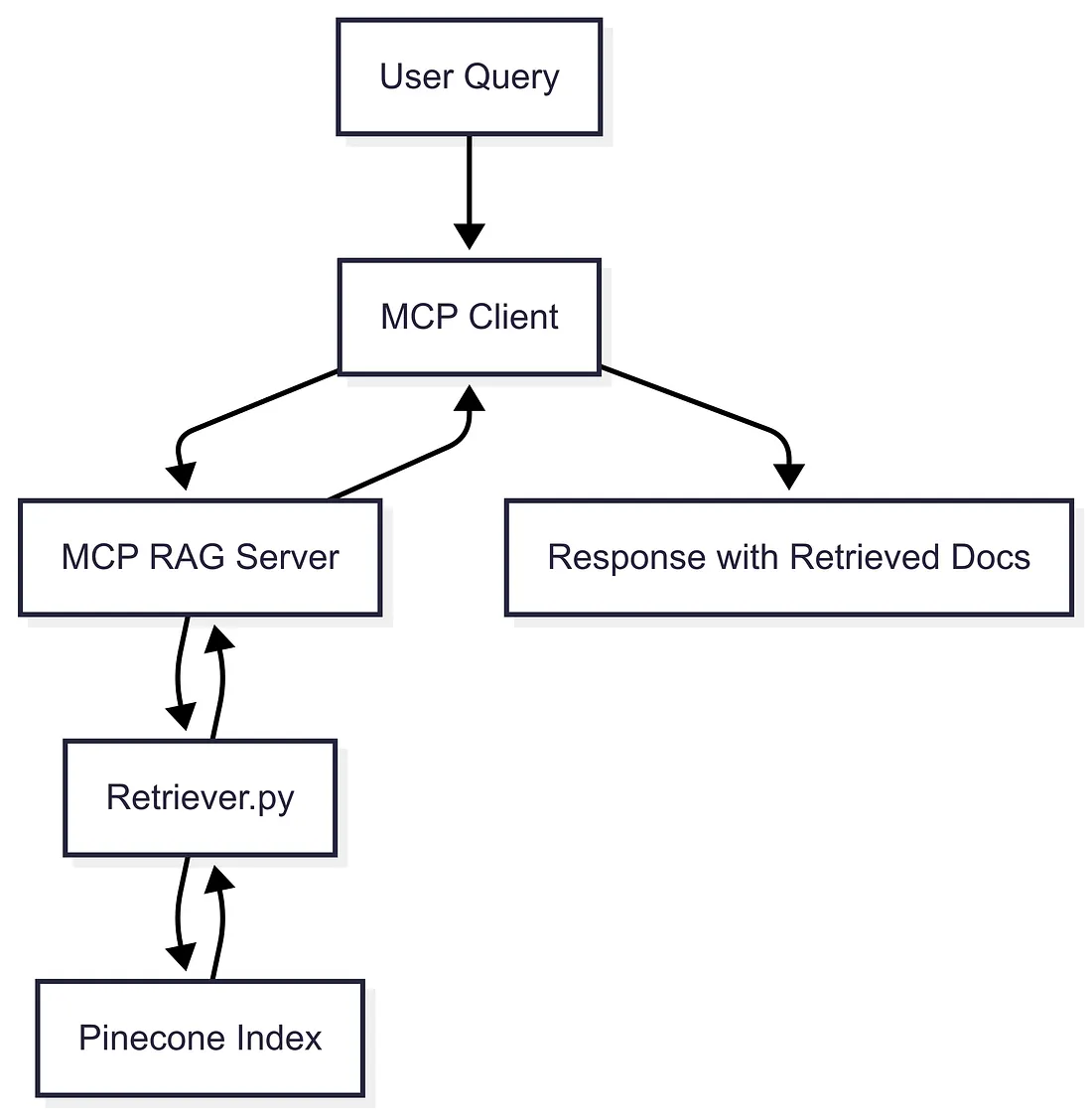
Step 1: Setup
Setting up the environment ensures secure access to OpenAI embeddings and Pinecone vector search, which are prerequisites for the MCP RAG Server.
pip install -r requirements.txt
The contents of requirements.txt are as follows:
fastapi>=0.109.0
uvicorn>=0.35.0
pydantic>=2.7.2
python-dotenv==1.0.0
openai>=1.6.0
pinecone-client==5.0.1
fastapi-mcp>=0.3.7
langchain-mcp-adapters>=0.1.0
langgraph>=0.2.0
Add the following to your .env file:
OPENAI_API_KEY=your_openai_key
PINECONE_KEY=your_pinecone_key
PINECONE_INDEX=your_index_name
Step 2: Retriever (retriever.py)
The Retriever embeds queries and runs Pinecone similarity search to pull the most relevant academic resources. This is the heart of the RAG pipeline.
# retriever.py

import pinecone
from dotenv import load_dotenv
import os
from openai import OpenAI
import json
import re
from typing import List, Tuple, Optional

class Retriever:
    def __init__(self):
        load_dotenv()  # Load environment variables from .env file
        self.openaiApiKey = os.environ["OPENAI_API_KEY"]  # Get OpenAI API key from environment
        self.openaiClient = OpenAI()  # Initialize OpenAI client
        self.pineconeClient = pinecone.Pinecone(api_key=os.environ["PINECONE_KEY"])  # Initialize Pinecone client
        self.pineconeIndex = self.pineconeClient.Index(os.environ["PINECONE_INDEX"])  # Get Pinecone index
        self.previousNextCount = 0  # Initialize counter for previous next
        self.totalVectorCount = self.pineconeIndex.describe_index_stats()['total_vector_count']  # Get total vector count

    def get_embedding(self, inputText: str, embeddingModel: str = "text-embedding-3-small") -> List[float]:
        """Generate embeddings for the input text using the specified model."""
        sanitizedText = inputText.replace("\n", " ")  # Sanitize input text
        return self.openaiClient.embeddings.create(input=[sanitizedText], model=embeddingModel).data[0].embedding

    def fetch_text_from_response(self, vectorId: str) -> Tuple[Optional[str], Optional[dict]]:
        """Fetch text and metadata from the Pinecone index based on the vector ID."""
        response: FetchResponse = self.pineconeIndex.fetch(ids=[vectorId], namespace="")

        if vectorId in response.vectors:
            vectorData = response.vectors[vectorId]
            metadata = vectorData.metadata
            contentText = metadata.get("content", None) if metadata else None
            return contentText, metadata
        return None, None

    def run_similarity_search(
        self,
        queryText: str,
        min_similarity: Optional[float] = None,
        top_k: Optional[int] = None
    ) -> List[str]:
        """
        Run a similarity search on the Pinecone index based on the query text.
        """

        # Get values from env with defaults
        min_similarity = min_similarity or float(os.getenv('RAG_MIN_SIMILARITY', '0.5'))
        top_k = top_k or int(os.getenv('RAG_TOP_K', '3'))

        queryEmbedding = self.get_embedding(queryText)
        searchResults = self.pineconeIndex.query(vector=queryEmbedding, top_k=top_k)

        vectorIdList = []
        for match in searchResults.get("matches", []):
            if match.get("score", 0) >= min_similarity:
                vectorIdList.append(match["id"])

        contextList = []
        for vectorId in vectorIdList:
            contentText, metadata = self.fetch_text_from_response(vectorId)
            if contentText is not None:
                contextList.append(f"{contentText}")

        return contextList

# Usage:
retriever = Retriever()
# result = retriever.run_similarity_search("Your query here")  # Example usage of similarity search
Step 3: MCP RAG Server (main.py)
Wrapping the endpoint in FastAPI MCP makes the server a self-describing AI tool. Any MCP client can dynamically discover it.
# main.py
from fastapi import FastAPI, HTTPException
from pydantic import BaseModel
from typing import List
from retriever import Retriever
from fastapi_mcp import FastApiMCP
import uvicorn

app = FastAPI(
    title="MCP RAG Server",
    description="Retrieve academic research, study guides, and exam materials",
    version="1.0.0"
)

retriever = Retriever()

class SearchRequest(BaseModel):
    query: str

class DocumentSearchResponse(BaseModel):
    query: str
    results: List[str]

@app.post("/search_documents", response_model=DocumentSearchResponse, operation_id="search_relevant_documents")
async def search_documents(request: SearchRequest):
    if not request.query.strip():
        raise HTTPException(status_code=400, detail="Query cannot be empty")
    results = retriever.run_similarity_search(request.query)
    return DocumentSearchResponse(query=request.query, results=results)

mcp = FastApiMCP(app)
mcp.mount()

if __name__ == "__main__":
    uvicorn.run(app, host="0.0.0.0", port=8001)
Step 4: Run & Test
To validate the server, I wrote a custom extract_tools.py, that generates a machine-readable MCP tool spec. This is the bridge between the server and any AI client.
Let's run the MCP Server:
uvicorn main:app --host 0.0.0.0 --port=8001
Let's have a look at the extract_tools.py:
# extract_tools.py
import os
import json
import asyncio
import logging
import time
from pprint import pprint
from typing import List, Dict, Any, Optional
from pathlib import Path
from contextlib import asynccontextmanager
from dotenv import load_dotenv
from langchain_mcp_adapters.client import MultiServerMCPClient

logging.basicConfig(
    level=logging.INFO,
    format='%(asctime)s - %(name)s - %(levelname)s - %(message)s',
)

logger = logging.getLogger(__name__)
load_dotenv()

class MCPClientError(Exception): pass
class ConfigurationError(MCPClientError): pass
class ConnectionError(MCPClientError): pass
class ToolExtractionError(MCPClientError): pass

class MCPToolsExtractor:
    def __init__(
        self,
        server_url: Optional[str] = None,
        output_file: Optional[str] = None,
        max_retries: int = 3,
        retry_delay: float = 1.0,
        timeout: float = 30.0
    ):
        self.server_url = server_url or os.getenv("MCP_SERVER_URL")
        self.output_file = output_file or os.getenv("JSON_FILE", "mcp_tools.json")
        self.max_retries = max_retries
        self.retry_delay = retry_delay
        self.timeout = timeout
        self.client: Optional[MultiServerMCPClient] = None
        self._validate_configuration()

    def _validate_configuration(self) -> None:
        if not self.server_url:
            raise ConfigurationError("MCP_SERVER_URL not provided in environment or parameters")
        if not self.server_url.startswith(('http://', 'https://')):
            raise ConfigurationError(f"Invalid SERVER_URL format: {self.server_url}")
        if not self.output_file:
            raise ConfigurationError("JSON_FILE not provided in environment or parameters")
        output_path = Path(self.output_file)
        try:
            output_path.parent.mkdir(parents=True, exist_ok=True)
        except PermissionError as e:
            raise ConfigurationError(f"Cannot create output directory: {e}")
        logger.info(f"Configuration validated - Server: {self.server_url}, Output: {self.output_file}")

    @asynccontextmanager
    async def _get_client(self):
        client = None
        try:
            client = MultiServerMCPClient({
                "server": {
                    "url": self.server_url,
                    "transport": "sse"
                }
            })
            logger.info(f"Created MCP client for {self.server_url}")
            yield client
        except Exception as e:
            logger.error(f"Failed to create MCP client: {e}")
            raise ConnectionError(f"Failed to create MCP client: {e}")
        finally:
            if client:
                try:
                    if hasattr(client, 'close'):
                        await client.close()
                    logger.info("MCP client cleaned up successfully")
                except Exception as e:
                    logger.warning(f"Error during client cleanup: {e}")

    async def _get_tools_with_retry(self, client: MultiServerMCPClient) -> List[Any]:
        last_exception = None
        for attempt in range(self.max_retries):
            try:
                logger.info(f"Attempting to get tools (attempt {attempt + 1}/{self.max_retries})")
                tools = await asyncio.wait_for(client.get_tools(), timeout=self.timeout)
                logger.info(f"Successfully retrieved {len(tools)} tools")
                return tools
            except asyncio.TimeoutError as e:
                last_exception = e
                logger.warning(f"Timeout on attempt {attempt + 1}: {e}")
            except Exception as e:
                last_exception = e
                logger.warning(f"Error on attempt {attempt + 1}: {e}")
            if attempt < self.max_retries - 1:
                delay = self.retry_delay * (2 ** attempt)
                logger.info(f"Waiting {delay}s before retry...")
                await asyncio.sleep(delay)
        raise ConnectionError(f"Failed to get tools after {self.max_retries} attempts. Last error: {last_exception}")

    def _extract_tool_attributes(self, tool: Any) -> Dict[str, Any]:
        for strategy_name, strategy in [
            ("vars()", self._extract_with_vars),
            ("__dict__", self._extract_with_dict),
            ("dir()", self._extract_with_dir),
            ("minimal", self._extract_minimal)
        ]:
            try:
                logger.debug(f"Trying extraction strategy: {strategy_name}")
                result = strategy(tool)
                if result:
                    logger.debug(f"Success with strategy: {strategy_name}")
                    return result
            except Exception as e:
                logger.debug(f"Strategy {strategy_name} failed: {e}")
        raise ToolExtractionError(f"All extraction strategies failed for tool: {getattr(tool, 'name', 'unknown')}")

    def _extract_with_vars(self, tool: Any) -> Dict[str, Any]:
        return vars(tool)

    def _extract_with_dict(self, tool: Any) -> Dict[str, Any]:
        return {k: v for k, v in tool.__dict__.items() if not k.startswith('_')}

    def _extract_with_dir(self, tool: Any) -> Dict[str, Any]:
        tool_dict = {}
        for attr_name in dir(tool):
            if not attr_name.startswith('_'):
                try:
                    attr_value = getattr(tool, attr_name)
                    if not callable(attr_value):
                        tool_dict[attr_name] = attr_value
                except (AttributeError, TypeError):
                    continue
        return tool_dict

    def _extract_minimal(self, tool: Any) -> Dict[str, Any]:
        minimal_attrs = ['name', 'description', 'inputSchema']
        tool_dict = {}
        for attr in minimal_attrs:
            try:
                if hasattr(tool, attr):
                    tool_dict[attr] = getattr(tool, attr)
            except Exception:
                continue
        if 'name' not in tool_dict:
            tool_dict['name'] = f"unknown_tool_{id(tool)}"
        return tool_dict

    def _custom_json_serializer(self, obj: Any) -> Any:
        if hasattr(obj, '__dict__'):
            return obj.__dict__
        elif hasattr(obj, '__str__'):
            return str(obj)
        elif callable(obj):
            return f"<callable: {obj.__name__ if hasattr(obj, '__name__') else 'unknown'}>"
        else:
            return str(type(obj))

    async def get_mcp_tools_as_json(self) -> List[Dict[str, Any]]:
        start_time = time.time()
        try:
            async with self._get_client() as client:
                tools = await self._get_tools_with_retry(client)
                if not tools:
                    logger.warning("No tools returned from MCP server")
                    return []
                tools_json = []
                failed_extractions = 0
                for i, tool in enumerate(tools):
                    try:
                        tool_dict = self._extract_tool_attributes(tool)
                        tools_json.append(tool_dict)
                        logger.debug(f"Successfully extracted tool: {tool_dict.get('name', f'tool_{i}')}")
                    except ToolExtractionError as e:
                        failed_extractions += 1
                        logger.error(f"Failed to extract tool {i}: {e}")
                        tools_json.append({
                            'name': f'failed_tool_{i}',
                            'error': str(e),
                        })

                elapsed_time = time.time() - start_time
                logger.info(f"Extracted {len(tools_json)} tools ({failed_extractions} failed) in {elapsed_time:.2f}s")
                pprint(tools_json)
                return tools_json
        except Exception as e:
            logger.error(f"Failed to get MCP tools: {e}")
            raise

    def save_tools_to_file(self, tools_json: List[Dict[str, Any]]) -> None:
        try:
            output_path = Path(self.output_file)
            with open(output_path, 'w', encoding='utf-8') as f:
                json.dump(
                    tools_json,
                    f,
                    indent=2,
                    default=self._custom_json_serializer,
                    ensure_ascii=False
                )
            file_size = output_path.stat().st_size
            logger.info(f"Successfully saved {len(tools_json)} tools to {self.output_file} ({file_size} bytes)")
        except (IOError, OSError, json.JSONEncodeError) as e:
            logger.error(f"Failed to save tools to file: {e}")
            raise IOError(f"Failed to save tools to {self.output_file}: {e}")

    async def extract_and_save_tools(self) -> Dict[str, Any]:
        start_time = time.time()
        try:
            logger.info("Starting MCP tools extraction...")
            tools_json = await self.get_mcp_tools_as_json()

            for tool in tools_json:
                if 'args_schema' in tool:
                    tool['inputSchema'] = tool.pop('args_schema')

            self.save_tools_to_file(tools_json)
            elapsed_time = time.time() - start_time
            summary = {
                'success': True,
                'tools_count': len(tools_json),
                'output_file': self.output_file,
                'elapsed_time': elapsed_time,
                'server_url': self.server_url,
                'timestamp': time.time()
            }
            logger.info(f"Operation completed successfully: {summary}")
            return summary
        except Exception as e:
            elapsed_time = time.time() - start_time
            summary = {
                'success': False,
                'error': str(e),
                'error_type': type(e).__name__,
                'elapsed_time': elapsed_time,
                'timestamp': time.time()
            }
            logger.error(f"Operation failed: {summary}")
            raise

def main():
    try:
        extractor = MCPToolsExtractor()
        summary = asyncio.run(extractor.extract_and_save_tools())
        print("\n" + "="*50)
        print("MCP TOOLS EXTRACTION SUMMARY")
        print("="*50)
        print(f"Status: {'SUCCESS' if summary['success'] else 'FAILED'}")
        print(f"Tools extracted: {summary.get('tools_count', 0)}")
        print(f"Output file: {summary.get('output_file', 'N/A')}")
        print(f"Time elapsed: {summary.get('elapsed_time', 0):.2f}s")
        print(f"Server URL: {summary.get('server_url', 'N/A')}")
        print("="*50)
        return 0 if summary['success'] else 1

    except ConfigurationError as e:
        logger.error(f"Configuration error: {e}")
        print(f"Configuration Error: {e}")
        print("Please check your .env file and ensure SERVER_URL is set correctly.")
        return 2

    except ConnectionError as e:
        logger.error(f"Connection error: {e}")
        print(f"Connection Error: {e}")
        print("Please check if the MCP server is running and accessible.")
        return 3

    except Exception as e:
        logger.error(f"Unexpected error: {e}")
        print(f"Unexpected Error: {e}")
        print("Check the log file for more details.")
        return 4

if __name__ == "__main__":
    exit_code = main()
    exit(exit_code)
And here is the sample rag_mcp_tools.json, that allows you to discover the available tools:
[
  {
    "name": "search_relevant_documents",
    "description": "MCP RAG Server - Access curated academic and study resources.",
    "inputSchema": {
      "type": "object",
      "properties": {
        "query": {
          "type": "string",
          "description": "The search query to find relevant education content"
        }
      },
      "required": ["query"]
    }
  }
]
This file is critical because:
- Self-describing API — It defines the MCP tool, its input schema, description, and expected output.
- Spec portability — You can use this JSON to integrate the MCP RAG Server into any MCP-compatible client without custom coding.
- Contract validation — The schema ensures the client sends the right arguments and receives the correct response format.
Validating the MCP Server with rag_mcp_tools.json
1. Check tool presence
- Ensure the file contains at least one tool entry.
- The
namefield should match your endpoint operation ID (search_relevant_documents).
2. Verify input schema
- Open the
inputSchemasection. - Make sure required fields (e.g.,
query) are present. - This ensures any client passing arguments will be validated correctly.
3. Match descriptions
- The
descriptionfield should accurately reflect what your RAG server does. - Updating this improves tool discoverability for AI agents.
4. Run a sample call using the schema
Use the JSON's inputSchema to craft a test query:
{"query": "Explain Newton's laws of motion"}
Send it to your /search_documents endpoint using Postman or a Python script.
Verify the response matches the results schema described in the JSON.
Conclusion
- Built a modular MCP RAG Server with FastAPI, Pinecone, and OpenAI.
- Exposed the service as a self-describing MCP tool for dynamic AI integration.
- Generated and validated
rag_mcp_tools.jsonto guarantee schema accuracy and reliable tool discovery.
This server demonstrates how MCP decouples retrieval from reasoning, while rag_mcp_tools.json provides a machine-readable spec that validates the server's behavior and enables plug-and-play integration with AI agents. Together, they create a scalable, domain-agnostic RAG service ready for production.
Next: In Part 2, we'll build the client-side LangGraph integration that consumes this MCP RAG Server.
The author is the Founder of Shark AI Solutions which specializes at building production grade value added solutions using AI
By [Shineyjeyaraj]