AI Strategy

Integrate LangGraph with an MCP RAG Server for Smarter AI Agents

Explore the latest developments in conversational AI, from advanced language models to multimodal interactions and their impact on business automation.

By Dr. Shiney Jeyaraj8 min read
Conversational AILLMsBusiness AutomationLangGraphAI Agents

Part 2: How to Integrate LangGraph with an MCP RAG Server for Smarter AI Agents?

Integrate a LangGraph AI agent with an MCP-powered RAG server to enable dynamic tool discovery, RAG-first workflows, and scalable education-focused AI assistants.

Introduction

In Part 1, we built a modular MCP RAG Server with Pinecone and OpenAI, exposing it as a self-describing tool with rag_mcp_tools.json.

Purpose

In this part, we'll connect a LangGraph AI agent to that server. The client will:

  • Dynamically discover the MCP tools using the validated rag_mcp_tools.json
  • Execute a RAG-first workflow to retrieve academic content
  • Use retrieved context to generate accurate, grounded answers

Why MCP RAG vs Traditional RAG?

Traditional RAG Limitations

Traditional RAG pipelines are tightly coupled to the client:

  • You hardcode the retrieval endpoint and schema
  • Changing the vector store or retriever requires code modifications
  • Multiple agents need separate integrations for the same RAG service

MCP RAG Server Advantages

  • Self-describing tools: Automatically exposes a machine-readable spec (rag_mcp_tools.json)
  • Dynamic discovery: Any MCP-compatible agent can consume it without manual wiring
  • Loose coupling: Swap vector stores or retrieval logic without breaking clients
  • Multi-agent ready: One MCP RAG Server serves multiple AI agents simultaneously
  • Schema validation: Ensures consistent input/output contracts for production-grade deployments

How the MCP RAG Server Works?

1. User Query → MCP Client

The LangGraph client sends a query via the MCP protocol.

2. Tool Discovery via rag_mcp_tools.json

The client first discovers the server's tools and validates the schema.

3. Retriever → Pinecone

The server embeds the query, performs a vector similarity search in Pinecone, and fetches the top matching academic content.

4. Return Context via MCP

The server wraps the retrieved documents in the defined DocumentSearchResponse schema and sends it back through MCP.

5. LLM Answer Generation

The LangGraph client feeds the retrieved content into the LLM, ensuring context-grounded responses.
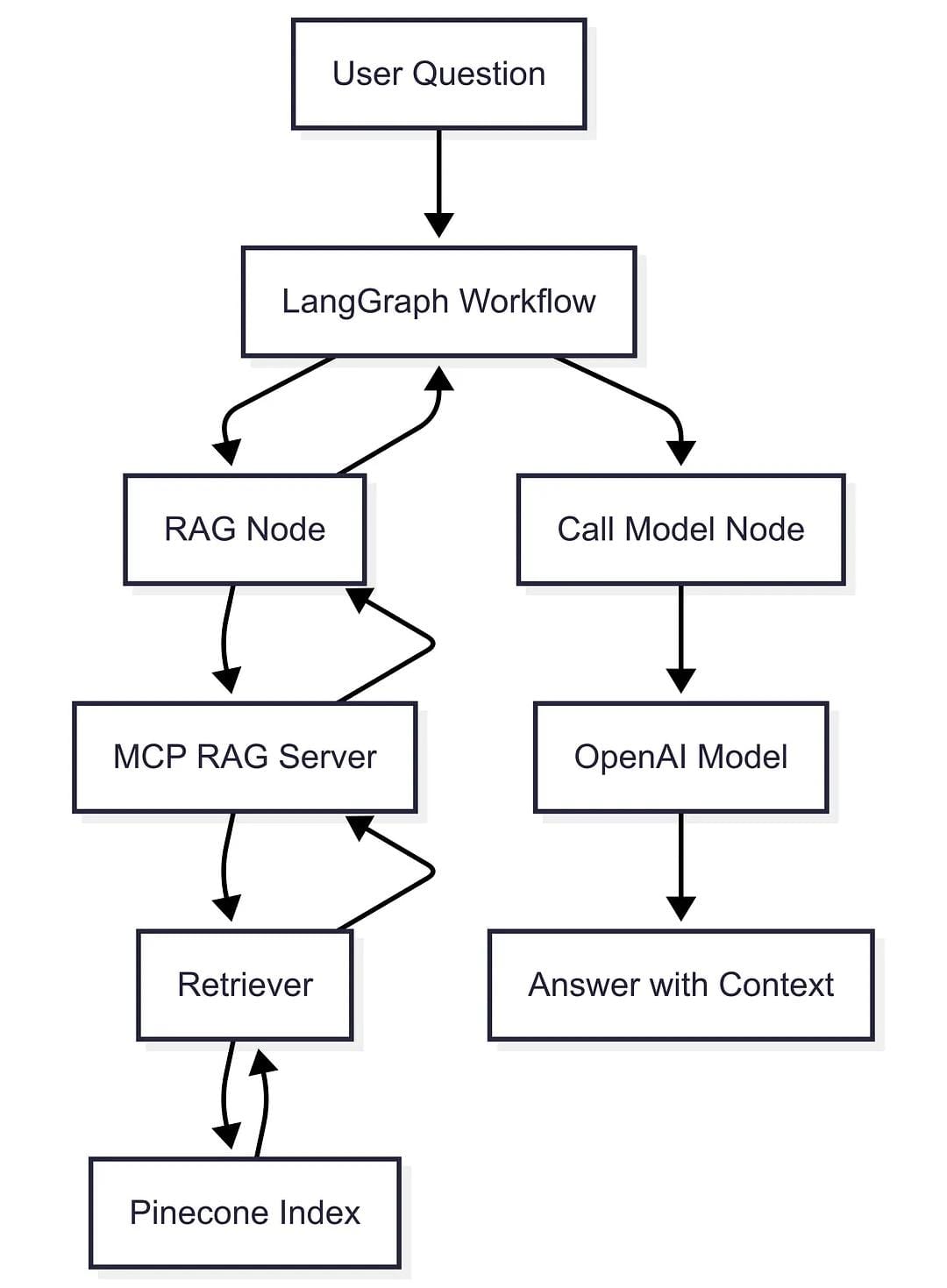
The High Level Workflow

Step 1: Define Graph State (state.py)

Tracks both the conversation and retrieved study materials, ensuring context flows into the AI model for accurate, RAG-powered responses.

from langgraph.graph import MessagesState
from typing import Optional, Dict, Any

class GraphState(MessagesState):
    retrieved_docs: Optional[Dict[str, Any]]

Step 2: Connect to MCP Tools (nodes.py)

MultiServerMCPClient dynamically loads the MCP RAG tool using rag_mcp_tools.json. This aligns with MCP's plug-and-play architecture, letting your AI agent consume tools without manual wiring.

import os
from .state import GraphState
from langchain_mcp_adapters.client import MultiServerMCPClient
from langchain.chat_models import init_chat_model
from langchain_core.messages import AIMessage

client = MultiServerMCPClient({
    "education_rag": {
        "url": os.getenv('RAG_MCP_SERVER_URL', "http://localhost:8001/mcp"),
        "transport": "sse",
    }
})

class AgentNodes:
    def __init__(self):
        self.model = init_chat_model("openai:gpt-4o")
        self.tools = None

    async def call_model(self, state: GraphState):
        if self.tools is None:
            self.tools = await self.get_tools()

        if state.get('retrieved_docs'):
            state["messages"].append(
                AIMessage(content="Retrieved study materials:\n" + str(state['retrieved_docs']))
            )

        response = self.model.invoke(state["messages"])
        state["messages"].append(response)
        return state

    async def get_tools(self):
        if self.tools is None:
            self.tools = await client.get_tools()
        return self.tools

Step 3: Build LangGraph Workflow (graph.py)

Enforcing a RAG-first execution ensures every answer is grounded in the academic content retrieved from the MCP RAG Server.

from langgraph.graph import StateGraph, START
from .state import GraphState
from .nodes import AgentNodes
from langgraph.prebuilt import ToolNode, tools_condition
from langchain_core.runnables import RunnableLambda
from langchain_core.messages import HumanMessage

def extract_query(messages):
    for m in reversed(messages):
        if isinstance(m, HumanMessage):
            return m.content
    return ""

class WorkflowManager:
    def __init__(self):
        self.workflow = StateGraph(GraphState)
        self.nodes = AgentNodes()

    async def _setup_workflow_graph(self):
        tools = await self.nodes.get_tools()
        rag_tool = next(t for t in tools if t.name == "search_relevant_documents")

        async def run_rag(state: GraphState):
            query = extract_query(state["messages"])
            rag_result = await rag_tool.ainvoke({"query": query})
            state["retrieved_docs"] = rag_result
            return state

        self.workflow.add_node("rag", RunnableLambda(run_rag))
        self.workflow.add_node("call_model", self.nodes.call_model)

        self.workflow.add_edge(START, "rag")
        self.workflow.add_edge("rag", "call_model")

Step 4: Run the Client

This step validates the end-to-end LangGraph + MCP RAG pipeline, ensuring your AI agent can use rag_mcp_tools.json for reliable tool discovery and produce context-aware answers.

1. Set the MCP server URL

RAG_MCP_SERVER_URL=http://localhost:8001/mcp

2. Start the client app and send a query

"Explain Newton's laws of motion."

3. Expected flow

  • RAG Node calls the MCP RAG Server
  • Retrieves study materials
  • Model generates grounded response using retrieved context

Conclusion

  • Successfully integrated a LangGraph client with the MCP RAG Server
  • Implemented a RAG-first AI workflow leveraging validated rag_mcp_tools.json
  • Demonstrated dynamic tool discovery and context-grounded answer generation

This client setup shows why MCP RAG outperforms traditional RAG. The use of rag_mcp_tools.json provides a contract-driven integration that guarantees schema validation, multi-agent compatibility, and loose coupling. This is the foundation for scalable, modular AI tutoring and education systems.

Next: If you haven't built the server yet, check out Part 1, where we create the MCP RAG Server and validate it with rag_mcp_tools.json for dynamic tool discovery.


The author is the Founder of Shark AI Solutions which specializes at building production grade value added solutions using AI

By Shineyjeyaraj

Integrate LangGraph with an MCP RAG Server for Smarter AI Agents

Author: Dr. Shiney Jeyaraj

Published: 2025-07-01

Category: AI Strategy

Reading Time: 8 min read

Tags: Conversational AI, LLMs, Business Automation, LangGraph, AI Agents

Excerpt: Explore the latest developments in conversational AI, from advanced language models to multimodal interactions and their impact on business automation.

Article Content

Part 2: How to Integrate LangGraph with an MCP RAG Server for Smarter AI Agents? Integrate a LangGraph AI agent with an MCP-powered RAG server to enable dynamic tool discovery, RAG-first workflows, and scalable education-focused AI assistants. Introduction In Part 1, we built a modular MCP RAG Server with Pinecone and OpenAI, exposing it as a self-describing tool with rag_mcp_tools.json . Purpose In this part, we'll connect a LangGraph AI agent to that server. The client will: Dynamically discover the MCP tools using the validated rag_mcp_tools.json Execute a RAG-first workflow to retrieve academic content Use retrieved context to generate accurate, grounded answers Why MCP RAG vs Traditional RAG? Traditional RAG Limitations Traditional RAG pipelines are tightly coupled to the client: You hardcode the retrieval endpoint and schema Changing the vector store or retriever requires code modifications Multiple agents need separate integrations for the same RAG service MCP RAG Server Advantages Self-describing tools : Automatically exposes a machine-readable spec ( rag_mcp_tools.json ) Dynamic discovery : Any MCP-compatible agent can consume it without manual wiring Loose coupling : Swap vector stores or retrieval logic without breaking clients Multi-agent ready : One MCP RAG Server serves multiple AI agents simultaneously Schema validation : Ensures consistent input/output contracts for production-grade deployments How the MCP RAG Server Works? 1. User Query → MCP Client The LangGraph client sends a query via the MCP protocol. 2. Tool Discovery via rag_mcp_tools.json The client first discovers the server's tools and validates the schema. 3. Retriever → Pinecone The server embeds the query, performs a vector similarity search in Pinecone, and fetches the top matching academic content. 4. Return Context via MCP The server wraps the retrieved documents in the defined DocumentSearchResponse schema and sends it back through MCP. 5. LLM Answer Generation The LangGraph client feeds the retrieved content into the LLM, ensuring context-grounded responses. Step 1: Define Graph State (state.py) Tracks both the conversation and retrieved study materials, ensuring context flows into the AI model for accurate, RAG-powered responses. from langgraph.graph import MessagesState from typing import Optional, Dict, Any class GraphState(MessagesState): retrieved_docs: Optional[Dict[str, Any]] Step 2: Connect to MCP Tools (nodes.py) MultiServerMCPClient dynamically loads the MCP RAG tool using rag_mcp_tools.json . This aligns with MCP's plug-and-play architecture, letting your AI agent consume tools without manual wiring. import os from .state import GraphState from langchain_mcp_adapters.client import MultiServerMCPClient from langchain.chat_models import init_chat_model from langchain_core.messages import AIMessage client = MultiServerMCPClient({ "education_rag": { "url": os.getenv('RAG_MCP_SERVER_URL', "http://localhost:8001/mcp"), "transport": "sse", } }) class AgentNodes: def __init__(self): self.model = init_chat_model("openai:gpt-4o") self.tools = None async def call_model(self, state: GraphState): if self.tools is None: self.tools = await self.get_tools() if state.get('retrieved_docs'): state["messages"].append( AIMessage(content="Retrieved study materials:\n" + str(state['retrieved_docs'])) ) response = self.model.invoke(state["messages"]) state["messages"].append(response) return state async def get_tools(self): if self.tools is None: self.tools = await client.get_tools() return self.tools Step 3: Build LangGraph Workflow (graph.py) Enforcing a RAG-first execution ensures every answer is grounded in the academic content retrieved from the MCP RAG Server. from langgraph.graph import StateGraph, START from .state import GraphState from .nodes import AgentNodes from langgraph.prebuilt import ToolNode, tools_condition from langchain_core.runnables import RunnableLambda from langchain_core.messages import HumanMessage def extract_query(messages): for m in reversed(messages): if isinstance(m, HumanMessage): return m.content return "" class WorkflowManager: def __init__(self): self.workflow = StateGraph(GraphState) self.nodes = AgentNodes() async def _setup_workflow_graph(self): tools = await self.nodes.get_tools() rag_tool = next(t for t in tools if t.name == "search_relevant_documents") async def run_rag(state: GraphState): query = extract_query(state["messages"]) rag_result = await rag_tool.ainvoke({"query": query}) state["retrieved_docs"] = rag_result return state self.workflow.add_node("rag", RunnableLambda(run_rag)) self.workflow.add_node("call_model", self.nodes.call_model) self.workflow.add_edge(START, "rag") self.workflow.add_edge("rag", "call_model") Step 4: Run the Client This step validates the end-to-end LangGraph + MCP RAG pipeline, ensuring your AI agent can use rag_mcp_tools.json for reliable tool discovery and produce context-aware answers. 1. Set the MCP server URL RAG_MCP_SERVER_URL=http://localhost:8001/mcp 2. Start the client app and send a query "Explain Newton's laws of motion." 3. Expected flow RAG Node calls the MCP RAG Server Retrieves study materials Model generates grounded response using retrieved context Conclusion Successfully integrated a LangGraph client with the MCP RAG Server Implemented a RAG-first AI workflow leveraging validated rag_mcp_tools.json Demonstrated dynamic tool discovery and context-grounded answer generation This client setup shows why MCP RAG outperforms traditional RAG. The use of rag_mcp_tools.json provides a contract-driven integration that guarantees schema validation, multi-agent compatibility, and loose coupling. This is the foundation for scalable, modular AI tutoring and education systems. Next: If you haven't built the server yet, check out Part 1, where we create the MCP RAG Server and validate it with rag_mcp_tools.json for dynamic tool discovery. The author is the Founder of Shark AI Solutions which specializes at building production grade value added solutions using AI By Shineyjeyaraj