AI Development

Extract Website Content for RAG, Context Engineering, and AI Pipelines

In today's AI-driven landscape, success is powered by access to accurate and timely content. Whether you're building Retrieval-Augmented Generation (RAG) systems, fine-tuning LLMs, or powering AI agents, one challenge remains: getting relevant content into your AI pipeline.

By SharkAI Team12 min read
ApifyContext EngineeringWeb ScrapingRAG

Web Scraping with Apify and Python: Extract Website Content for RAG, Context Engineering, and AI Pipelines

In today's AI-driven landscape, success is powered by access to accurate and timely content. Whether you're building Retrieval-Augmented Generation (RAG) systems, fine-tuning LLMs, or powering AI agents, one challenge remains: getting relevant content into your AI pipeline.

That's where web scraping with Apify + Python becomes a game-changer.

This guide will show you how to:

  • Crawl any website using Apify's Website Content Crawler
  • Clean and extract readable content using Python
  • Structure data for downstream use in RAG, context engineering, and LLMs

Why This Matters for AI

RAG pipelines rely on factual, domain-specific, and often real-time content. LLMs alone don't contain up-to-date business insights or product knowledge. Scraping from target websites enables you to:

  • Provide live context to AI agents
  • Build semantic search or question answering systems
  • Enrich LLMs with content that is not in training corpora

For example, crawling your own product or service website allows you to build a private GPT that truly understands your business.

What Is Context Engineering?

Context Engineering refers to the practice of strategically selecting, preparing, and injecting information into the prompt window of a large language model (LLM) to improve accuracy, relevance, and control.

In a Retrieval-Augmented Generation (RAG) setup, context engineering includes:

  • Selecting relevant external content
  • Ensuring the context is clean, structured, and domain-specific
  • Making sure the content is up-to-date and trustworthy

By scraping target websites — such as your own business, documentation, or competitor resources — you're building the foundation of engineered context for your AI models.

Think of it as building a real-time knowledge brain for your AI — one that you control.

Build a Python Web Scraper Using Apify

We'll use Apify's Website Content Crawler actor, which extracts readable text from web pages.

Requirements

  • Apify API Token
  • Python 3.7+
  • requests module

Get Started with Apify

Before running the scraper, you'll need to:

  1. Create an Apify account - Go to https://console.apify.com/ and sign up for a free account.

  2. Generate your Apify API token - Navigate to Integrations > API and copy your API token — you'll need this to authenticate your requests.

  3. Choose the right Actor - In this tutorial, we use the Website Content Crawler Actor by Apify. It allows you to extract readable text from almost any website, supports JavaScript rendering, and can be configured for depth, page limits, and content cleaning.
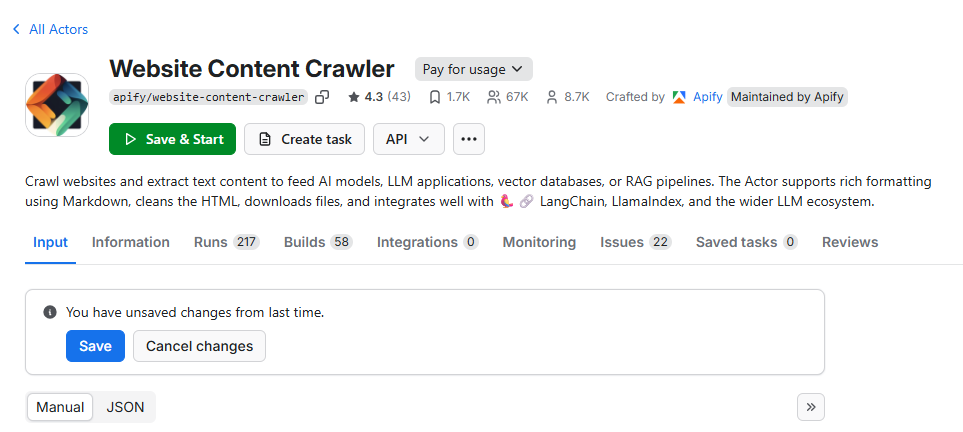
Apify Console Dashboard

  1. Review usage limits - If you're on the free plan, Apify offers a generous monthly credit to test and run these scrapers.

Note: If you're using a custom or private actor, replace apify/website-content-crawler in the code with your own actor_id.

Python Code

import requests
import time

class ApifyScraper:
    def __init__(self, actor_id, token, memory_mbytes=2048, timeout_secs=120):
        self.actor_id = actor_id
        self.token = token
        self.memory_mbytes = memory_mbytes
        self.timeout_secs = timeout_secs
        self.base_url = f"https://api.apify.com/v2/acts/{actor_id}"
    
    def run(self, input_payload):
        run_url = f"{self.base_url}/runs?token={self.token}"
        response = requests.post(run_url, json={
            "memoryMbytes": self.memory_mbytes,
            "timeoutSecs": self.timeout_secs,
            "input": input_payload
        })
        
        if response.status_code != 201:
            raise Exception(f"Failed to start Apify actor: {response.text}")
        
        run_id = response.json()["data"]["id"]
        status = "RUNNING"
        
        while status in ["RUNNING", "READY"]:
            time.sleep(3)
            status_response = requests.get(
                f"https://api.apify.com/v2/actor-runs/{run_id}?token={self.token}"
            )
            status = status_response.json()["data"]["status"]
        
        if status != "SUCCEEDED":
            raise Exception(f"Actor failed with status: {status}")
        
        dataset_id = status_response.json()["data"]["defaultDatasetId"]
        dataset_response = requests.get(
            f"https://api.apify.com/v2/datasets/{dataset_id}/items?token={self.token}&clean=true"
        )
        
        results = dataset_response.json()
        if not results:
            return {"text": ""}
        
        return {"text": results[0].get("text", "")}

def get_website_text_content(url: str) -> str:
    scraper = ApifyScraper(
        actor_id="apify/website-content-crawler",
        token="YOUR_APIFY_TOKEN"  # Replace with your token
    )
    
    input_payload = {
        "startUrls": [{"url": url}],
        "crawlerType": "cheerio",
        "includeText": True,
        "maxDepth": 1,
        "maxPagesPerRun": 5,
        "maxContentLength": 100000,
        "minTextLength": 100,
        "removeScripts": True,
        "removeStyles": True,
        "removeCookies": True
    }
    
    return scraper.run(input_payload).get("text", "")

Try It On Your Website

content = get_website_text_content("https://www.sharkaisolutions.com/")
print(content[:1000])  # Preview the first 1000 characters

Example Output

ADVANCED AI SOLUTIONS
Unlock Business Value with Robust AI
Leveraging advanced AI, we transform your complex challenges into real growth opportunities. 
Get tailored solutions for measurable impact.

Why Apify Over Traditional Scrapers?

  1. No browser needed - API-driven approach eliminates browser overhead
  2. API-driven - Clean, programmatic interface for automation
  3. Works at scale - Handle thousands of pages efficiently
  4. Clean content output - Pre-processed, readable text extraction
  5. Easy to integrate - Simple REST API calls

Use Cases for Extracted Content

Use this extracted content to:

  • Create embeddings and store in vector DB (e.g. Pinecone, FAISS)
  • Inject into RAG prompts for context-aware responses
  • Summarize with OpenAI or Claude for quick insights
  • Analyze trends or extract structured knowledge
  • Build knowledge bases for AI agents and chatbots

Integration Example

# Example: Prepare content for RAG pipeline
def prepare_for_rag(url: str):
    # Extract content
    content = get_website_text_content(url)
    
    # Clean and chunk the content
    chunks = content.split('\n\n')  # Simple chunking
    cleaned_chunks = [chunk.strip() for chunk in chunks if len(chunk.strip()) > 50]
    
    # Return structured data ready for embedding
    return {
        "url": url,
        "content_chunks": cleaned_chunks,
        "total_length": len(content),
        "chunk_count": len(cleaned_chunks)
    }

# Usage
rag_data = prepare_for_rag("https://example.com")
print(f"Extracted {rag_data['chunk_count']} chunks from {rag_data['url']}")

Installation and Setup

First, install the required dependencies:

pip install requests

Set up your Apify token as an environment variable:

export APIFY_TOKEN="your_apify_token_here"

Or modify the code to read from environment variables:

import os

def get_website_text_content(url: str) -> str:
    scraper = ApifyScraper(
        actor_id="apify/website-content-crawler",
        token=os.getenv("APIFY_TOKEN")  # Read from environment
    )
    # ... rest of the function

Conclusion

Web scraping is no longer a niche activity — it's a core enabler of smart AI systems. Whether you're building a chatbot, a research assistant, or a document search tool, feeding your pipeline with real-world content gives you the edge.

With Apify + Python, you now have a reliable, clean, and scalable way to access public web data and turn it into structured, AI-ready knowledge.

Next Steps:

  • Try it on your site or your competitors'
  • Build embeddings from the extracted content
  • Create a RAG pipeline with the structured data
  • Build smarter AI with real-time web knowledge

The author is the Founder of Shark AI Solutions which specializes at building production grade value added solutions using AI

Extract Website Content for RAG, Context Engineering, and AI Pipelines

Author: SharkAI Team

Published: 2025-08-12

Category: AI Development

Reading Time: 12 min read

Tags: Apify, Context Engineering, Web Scraping, RAG

Excerpt: In today's AI-driven landscape, success is powered by access to accurate and timely content. Whether you're building Retrieval-Augmented Generation (RAG) systems, fine-tuning LLMs, or powering AI agents, one challenge remains: getting relevant content into your AI pipeline.

Article Content

Web Scraping with Apify and Python: Extract Website Content for RAG, Context Engineering, and AI Pipelines In today's AI-driven landscape, success is powered by access to accurate and timely content. Whether you're building Retrieval-Augmented Generation (RAG) systems, fine-tuning LLMs, or powering AI agents, one challenge remains: getting relevant content into your AI pipeline. That's where web scraping with Apify + Python becomes a game-changer. This guide will show you how to: Crawl any website using Apify's Website Content Crawler Clean and extract readable content using Python Structure data for downstream use in RAG, context engineering, and LLMs Why This Matters for AI RAG pipelines rely on factual, domain-specific, and often real-time content. LLMs alone don't contain up-to-date business insights or product knowledge. Scraping from target websites enables you to: Provide live context to AI agents Build semantic search or question answering systems Enrich LLMs with content that is not in training corpora For example, crawling your own product or service website allows you to build a private GPT that truly understands your business. What Is Context Engineering? Context Engineering refers to the practice of strategically selecting, preparing, and injecting information into the prompt window of a large language model (LLM) to improve accuracy, relevance, and control. In a Retrieval-Augmented Generation (RAG) setup, context engineering includes: Selecting relevant external content Ensuring the context is clean, structured, and domain-specific Making sure the content is up-to-date and trustworthy By scraping target websites — such as your own business, documentation, or competitor resources — you're building the foundation of engineered context for your AI models. Think of it as building a real-time knowledge brain for your AI — one that you control. Build a Python Web Scraper Using Apify We'll use Apify's Website Content Crawler actor, which extracts readable text from web pages. Requirements Apify API Token Python 3.7+ requests module Get Started with Apify Before running the scraper, you'll need to: Create an Apify account - Go to https://console.apify.com/ and sign up for a free account. Generate your Apify API token - Navigate to Integrations > API and copy your API token — you'll need this to authenticate your requests. Choose the right Actor - In this tutorial, we use the Website Content Crawler Actor by Apify. It allows you to extract readable text from almost any website, supports JavaScript rendering, and can be configured for depth, page limits, and content cleaning. Review usage limits - If you're on the free plan, Apify offers a generous monthly credit to test and run these scrapers. Note: If you're using a custom or private actor, replace apify/website-content-crawler in the code with your own actor_id . Python Code import requests import time class ApifyScraper: def __init__(self, actor_id, token, memory_mbytes=2048, timeout_secs=120): self.actor_id = actor_id self.token = token self.memory_mbytes = memory_mbytes self.timeout_secs = timeout_secs self.base_url = f"https://api.apify.com/v2/acts/{actor_id}" def run(self, input_payload): run_url = f"{self.base_url}/runs?token={self.token}" response = requests.post(run_url, json={ "memoryMbytes": self.memory_mbytes, "timeoutSecs": self.timeout_secs, "input": input_payload }) if response.status_code != 201: raise Exception(f"Failed to start Apify actor: {response.text}") run_id = response.json()["data"]["id"] status = "RUNNING" while status in ["RUNNING", "READY"]: time.sleep(3) status_response = requests.get( f"https://api.apify.com/v2/actor-runs/{run_id}?token={self.token}" ) status = status_response.json()["data"]["status"] if status != "SUCCEEDED": raise Exception(f"Actor failed with status: {status}") dataset_id = status_response.json()["data"]["defaultDatasetId"] dataset_response = requests.get( f"https://api.apify.com/v2/datasets/{dataset_id}/items?token={self.token}&clean=true" ) results = dataset_response.json() if not results: return {"text": ""} return {"text": results[0].get("text", "")} def get_website_text_content(url: str) -> str: scraper = ApifyScraper( actor_id="apify/website-content-crawler", token="YOUR_APIFY_TOKEN" # Replace with your token ) input_payload = { "startUrls": [{"url": url}], "crawlerType": "cheerio", "includeText": True, "maxDepth": 1, "maxPagesPerRun": 5, "maxContentLength": 100000, "minTextLength": 100, "removeScripts": True, "removeStyles": True, "removeCookies": True } return scraper.run(input_payload).get("text", "") Try It On Your Website content = get_website_text_content("https://www.sharkaisolutions.com/") print(content[:1000]) # Preview the first 1000 characters Example Output ADVANCED AI SOLUTIONS Unlock Business Value with Robust AI Leveraging advanced AI, we transform your complex challenges into real growth opportunities. Get tailored solutions for measurable impact. Why Apify Over Traditional Scrapers? No browser needed - API-driven approach eliminates browser overhead API-driven - Clean, programmatic interface for automation Works at scale - Handle thousands of pages efficiently Clean content output - Pre-processed, readable text extraction Easy to integrate - Simple REST API calls Use Cases for Extracted Content Use this extracted content to: Create embeddings and store in vector DB (e.g. Pinecone, FAISS) Inject into RAG prompts for context-aware responses Summarize with OpenAI or Claude for quick insights Analyze trends or extract structured knowledge Build knowledge bases for AI agents and chatbots Integration Example # Example: Prepare content for RAG pipeline def prepare_for_rag(url: str): # Extract content content = get_website_text_content(url) # Clean and chunk the content chunks = content.split('\n\n') # Simple chunking cleaned_chunks = [chunk.strip() for chunk in chunks if len(chunk.strip()) > 50] # Return structured data ready for embedding return { "url": url, "content_chunks": cleaned_chunks, "total_length": len(content), "chunk_count": len(cleaned_chunks) } # Usage rag_data = prepare_for_rag("https://example.com") print(f"Extracted {rag_data['chunk_count']} chunks from {rag_data['url']}") Installation and Setup First, install the required dependencies: pip install requests Set up your Apify token as an environment variable: export APIFY_TOKEN="your_apify_token_here" Or modify the code to read from environment variables: import os def get_website_text_content(url: str) -> str: scraper = ApifyScraper( actor_id="apify/website-content-crawler", token=os.getenv("APIFY_TOKEN") # Read from environment ) # ... rest of the function Conclusion Web scraping is no longer a niche activity — it's a core enabler of smart AI systems. Whether you're building a chatbot, a research assistant, or a document search tool, feeding your pipeline with real-world content gives you the edge. With Apify + Python, you now have a reliable, clean, and scalable way to access public web data and turn it into structured, AI-ready knowledge. Next Steps: Try it on your site or your competitors' Build embeddings from the extracted content Create a RAG pipeline with the structured data Build smarter AI with real-time web knowledge The author is the Founder of Shark AI Solutions which specializes at building production grade value added solutions using AI