LoRA Fine-Tuning with Stable Diffusion: How Businesses Can Personalize AI Images (with Code)
In today's world of Generative AI, businesses across industries are looking beyond stock visuals and generic AI images. What they need are personalized, brand-specific, and context-aware visuals that improve user experience and drive conversions.
One of the most powerful techniques to achieve this is LoRA (Low-Rank Adaptation) fine-tuning — a lightweight method to adapt large AI models like Stable Diffusion to a specific style or industry dataset.
We originally built this pipeline for a travel personalization client, who wanted to show real-time destination previews inside their itinerary planner. For confidentiality, we're demonstrating the exact same code here on a public Yarn-Art style dataset — but the workflow is identical to what we delivered for the client.
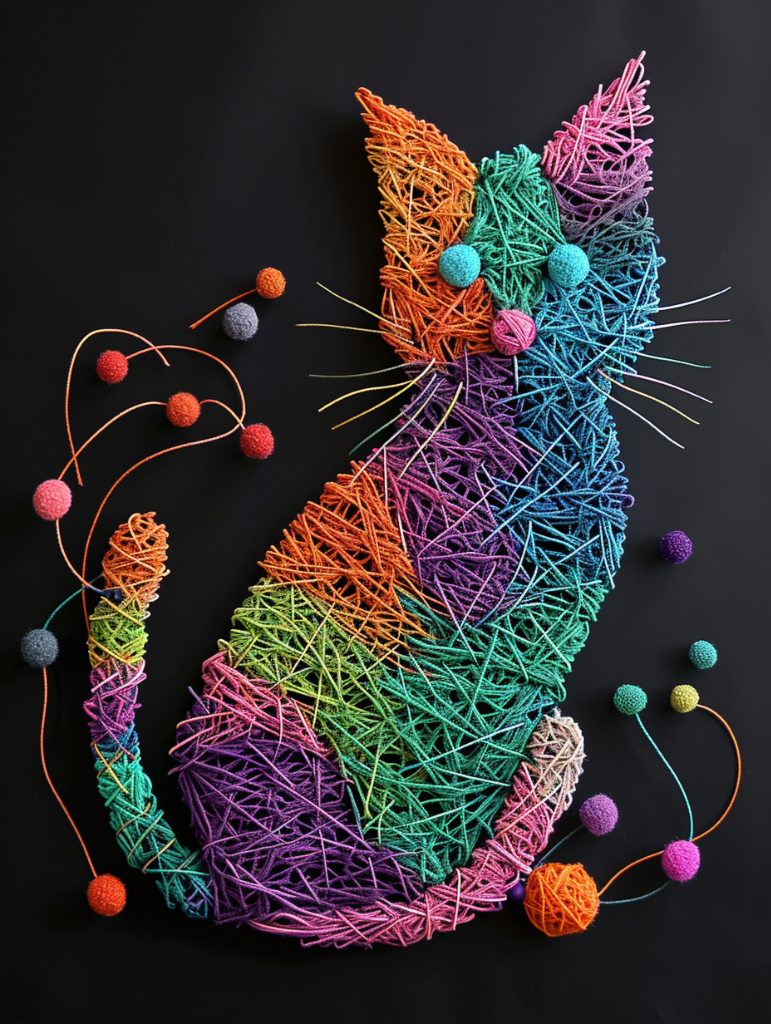
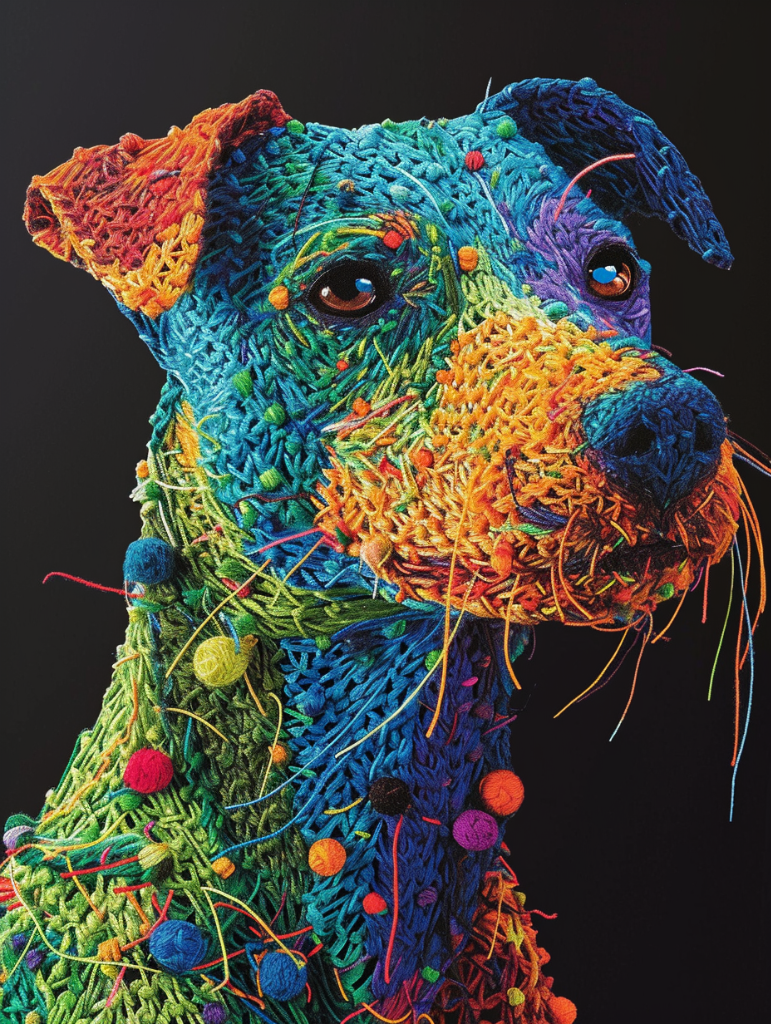
Yarn art is a form of textile art where images, objects, or decorations are created by arranging, wrapping, or weaving colored yarn. Few examples of Yarn art are below:
This post will cover:
- How LoRA fine-tuning works step by step
- The travel personalization client case study
- A public dataset demo with code (so you can reproduce it)
- The significance of each stage in the pipeline
- How to evaluate and visualize your results
Business Applications Across Industries
LoRA fine-tuning is not just for travel. Once trained, LoRA adapters unlock industry-specific personalization:
- Travel & Hospitality → Generate real-time destination previews (hotels, landmarks, beaches)
- E-commerce → Create product mockups or seasonal banners in a consistent style
- Marketing & Advertising → Produce brand-consistent visuals instantly for campaigns
- Finance & Insurance → Generate infographics & explainer visuals tailored to customer journeys
- Gaming & Media → Adapt models to a specific art style for immersive experiences
- AI Assistants → Make chatbot / RAG experiences visually dynamic & engaging
Why this matters: LoRA turns AI content from being generic → into being business-aware, brand-aligned, and user-personalized.
Real-World Use Case: Travel Personalization Client
The client's challenge
- Text-only itineraries lacked visual engagement
- Stock photos were too generic and repetitive
- Off-the-shelf AI models produced inconsistent quality
Our solution
- Fine-tuned Stable Diffusion with LoRA on destination-specific curated images
- Generated visuals like "Eiffel Tower at sunset", "Maldives beach resort", "Swiss Alps ski lodge"
- Integrated images dynamically into the itinerary planner
Business impact
Travelers saw personalized visual previews of their journey → increased engagement, longer site interaction, and higher booking conversions.
Why LoRA Fine-Tuning?
Traditional fine-tuning of large models is expensive and resource-intensive. LoRA solves this by:
- Training only small adapter layers in the attention blocks
- Producing tiny weights (~few MBs) instead of retraining full models
- Retaining general world knowledge while adding custom style/domain knowledge
- Allowing fast re-training when new datasets arrive
For our travel client, LoRA was the perfect trade-off: business value with low cost.
Workflow & Files
We built the pipeline in a modular way, so each part is replaceable and reusable:
- preprocess_data.py → Cleans images + captions, builds metadata file
- train_metadata.json → Dataset mapping (image → caption)
- config.yaml → Training hyperparameters
- train_lora.py → Main LoRA training script
- generate_images.py → Load model + generate new images
- Colab Notebook → Orchestrates everything in the cloud (GPU ready)

Step 1: Prepare the Environment
Install dependencies:
pip install -r lora_training_project/requirements.txt
Step 2: Preprocess Dataset → train_metadata.json
Run:
python preprocess_data.py --input data/yarn_art_export --output train_metadata.json
It produces entries like:
{
  "image": "data/yarn_art_export/yarn_001.png",
  "caption": "Frog, yarn art style"
}
Captions are critical → they guide how prompts map to visuals. Good captions = better generation.
Step 3: Configure Training → config.yaml
training:
  base_model: "SG161222/Realistic_Vision_V5.1_noVAE"
  resolution: 512
  train_batch_size: 2
  learning_rate: 1e-4
  num_train_epochs: 10
  mixed_precision: "fp16"
  output_dir: "output"
Key parameters:
- resolution impacts detail vs GPU cost
- epochs control style strength (too low = underfit, too high = overfit)
- fp16 saves VRAM (important for Colab / smaller GPUs)
Step 4: Train LoRA → train_lora.py
This is how LoRA training script looks like:
#!/usr/bin/env python3
"""LoRA Training Script for Custom Icon-Style Images"""

import os
import json
import math
import argparse
import random
from pathlib import Path
from typing import Dict, List, Optional, Tuple

import torch
import torch.nn.functional as F
from torch.utils.data import Dataset, DataLoader
from PIL import Image
from tqdm.auto import tqdm

# Diffusers and transformers
from diffusers import (
    DDPMScheduler,
    UNet2DConditionModel,
    AutoencoderKL
)
from diffusers.optimization import get_scheduler
from transformers import CLIPTextModel, CLIPTokenizer

# LoRA and training utilities
from peft import LoraConfig, get_peft_model
from accelerate import Accelerator
from accelerate.logging import get_logger
from accelerate.utils import set_seed
import torchvision.transforms as transforms

logger = get_logger(__name__)

class IconDataset(Dataset):
    """Dataset class for loading icon images and captions."""

    def __init__(
        self,
        data_path: str,
        tokenizer: CLIPTokenizer,
        size: int = 512,
        center_crop: bool = True,
        caption_dropout: float = 0.1
    ):
        self.size = size
        self.center_crop = center_crop
        self.tokenizer = tokenizer
        self.caption_dropout = caption_dropout

        # Load training metadata
        with open(data_path, 'r', encoding='utf-8') as f:
            self.metadata = json.load(f)

        # Update paths to be relative to the project root
        self.training_data = []
        for item in self.metadata['training_data']:
            # Make a copy to avoid modifying original
            item = item.copy()

            # Fix the processed_path to be relative to project root
            processed_path = item['processed_path']
            if 'training_data' in processed_path:
                # Keep as is if it already has training_data
                item['processed_path'] = processed_path
            else:
                # Add training_data prefix if needed
                item['processed_path'] = f"training_data/{processed_path}"

            self.training_data.append(item)

        logger.info(f"Loaded dataset with {len(self.training_data)} images")

    def __len__(self):
        return len(self.training_data)

    def __getitem__(self, idx):
        item = self.training_data[idx]
        image_path = item['processed_path']
        caption = item['caption']

        # Fix path separators for cross-platform compatibility
        image_path = image_path.replace('\\', '/')

        # If we're running from outside the project directory, prepend the project path
        if not os.path.exists(image_path):
            # Try with lora_training_project prefix
            alt_path = f"lora_training_project/{image_path}"
            if os.path.exists(alt_path):
                image_path = alt_path
            else:
                # Debug: show what we're looking for and what exists
                print(f"Could not find image at: {image_path}")
                print(f"Also tried: {alt_path}")
                print(f"Current working directory: {os.getcwd()}")
                print("Available files in current directory:")
                for f in os.listdir('.'):
                    print(f"  - {f}")
                if os.path.exists('lora_training_project'):
                    print("Files in lora_training_project:")
                    for f in os.listdir('lora_training_project'):
                        print(f"  - {f}")
                raise FileNotFoundError(f"Could not find image: {image_path}")

        # Randomly drop caption with probability caption_dropout
        if random.random() < self.caption_dropout:
            caption = ''

        # Load and preprocess image
        image = Image.open(image_path).convert('RGB')

        # Apply transforms
        if self.center_crop:
            transform = transforms.Compose([
                transforms.Resize(self.size, interpolation=transforms.InterpolationMode.BILINEAR),
                transforms.CenterCrop(self.size),
                transforms.ToTensor(),
                transforms.Normalize([0.5], [0.5])
            ])
        else:
            transform = transforms.Compose([
                transforms.Resize((self.size, self.size), interpolation=transforms.InterpolationMode.BILINEAR),
                transforms.ToTensor(),
                transforms.Normalize([0.5], [0.5])
            ])

        image = transform(image)

        # Tokenize caption
        tokenized = self.tokenizer(
            caption,
            padding='max_length',
            max_length=self.tokenizer.model_max_length,
            truncation=True,
            return_tensors='pt'
        )

        return {
            'pixel_values': image,
            'input_ids': tokenized.input_ids.squeeze(),
            'attention_mask': tokenized.attention_mask.squeeze()
        }

def load_models(model_id: str, device: torch.device) -> Tuple:
    """Load and return all required models."""
    logger.info(f"Loading models from: {model_id}")

    # Load tokenizer and text encoder
    tokenizer = CLIPTokenizer.from_pretrained(model_id, subfolder="tokenizer")
    text_encoder = CLIPTextModel.from_pretrained(model_id, subfolder="text_encoder")

    # Load VAE and UNet
    vae = AutoencoderKL.from_pretrained(model_id, subfolder="vae")
    unet = UNet2DConditionModel.from_pretrained(model_id, subfolder="unet")

    # Load noise scheduler
    noise_scheduler = DDPMScheduler.from_pretrained(model_id, subfolder="scheduler")

    # Move to device and set to eval mode
    for model in [text_encoder, vae, unet]:
        model.to(device)
        model.eval()
        model.requires_grad_(False)

    logger.info("✓ Models loaded successfully")
    return tokenizer, text_encoder, vae, unet, noise_scheduler

def setup_lora(unet: UNet2DConditionModel, config: Dict) -> UNet2DConditionModel:
    """Setup LoRA configuration for UNet."""
    # Handle nested config structure
    training_config = config.get('training', config)

    lora_config = LoraConfig(
        r=training_config.get('lora_rank', 4),
        lora_alpha=training_config.get('lora_alpha', 32),
        target_modules=["to_k", "to_q", "to_v", "to_out.0"],
        lora_dropout=training_config.get('lora_dropout', 0.1),
    )

    unet = get_peft_model(unet, lora_config)
    unet.print_trainable_parameters()

    logger.info("✓ LoRA configuration applied to UNet")
    return unet

def compute_loss(model_pred: torch.Tensor, target: torch.Tensor) -> torch.Tensor:
    """Compute training loss."""
    return F.mse_loss(model_pred.float(), target.float(), reduction="mean")

# ... (Additional training functions would continue here)
Run training:
python train_lora.py \
  --config config.yaml \
  --data train_metadata.json \
  --output output
Only attention adapters are trained → making training faster, cheaper, and scalable.
Step 5: Generate Images → generate_images.py
This is how the generate_images.py looks like:
#!/usr/bin/env python3
"""Image Generation Script for Trained LoRA Model"""

import os
import json
import argparse
from pathlib import Path
from typing import Dict, List, Optional

import yaml
import torch
from PIL import Image
import numpy as np
from diffusers import StableDiffusionPipeline, DPMSolverMultistepScheduler
from peft import PeftModel
import pandas as pd

def load_config(config_path: str = "config.yaml") -> Dict:
    """Load configuration from YAML file."""
    try:
        with open(config_path, 'r') as file:
            return yaml.safe_load(file)
    except FileNotFoundError:
        print(f"Warning: Config file {config_path} not found. Using default settings.")
        return {}

def load_trained_pipeline(
    base_model_id: str,
    lora_path: str,
    device: str = "cuda"
) -> StableDiffusionPipeline:
    """Load the trained LoRA model and create inference pipeline."""
    print(f"Loading base model: {base_model_id}")

    # Load base pipeline
    pipeline = StableDiffusionPipeline.from_pretrained(
        base_model_id,
        torch_dtype=torch.float16 if device == "cuda" else torch.float32,
        safety_checker=None,
        requires_safety_checker=False,
    )

    # Load LoRA weights
    print(f"Loading LoRA weights from: {lora_path}")
    pipeline.unet = PeftModel.from_pretrained(pipeline.unet, lora_path)

    # Keep the original scheduler (more compatible)
    print("✓ Using original model scheduler")

    # Move to device
    pipeline = pipeline.to(device)

    # Enable memory efficient attention if available
    if hasattr(pipeline, "enable_xformers_memory_efficient_attention"):
        try:
            pipeline.enable_xformers_memory_efficient_attention()
            print("✓ Enabled xformers memory efficient attention")
        except Exception:
            print("⚠ xformers not available, using standard attention")

    # Enable CPU offload for lower VRAM usage
    if device == "cuda":
        pipeline.enable_model_cpu_offload()
        print("✓ Enabled model CPU offload")

    print("✓ Pipeline loaded successfully")
    return pipeline

def generate_images(
    pipeline: StableDiffusionPipeline,
    prompts: List[str],
    output_dir: str,
    num_images_per_prompt: int = 1,
    num_inference_steps: int = 20,
    guidance_scale: float = 7.5,
    negative_prompt: str = "blurry, low quality, distorted, ugly, bad anatomy",
    height: int = 512,
    width: int = 512,
    seed: Optional[int] = None
) -> List[List[Image.Image]]:
    """Generate images from prompts using the trained LoRA model."""

    output_path = Path(output_dir)
    output_path.mkdir(parents=True, exist_ok=True)

    all_images = []
    generation_metadata = []

    # Set up generator for reproducibility
    generator = torch.Generator(device=pipeline.device)
    if seed is not None:
        generator.manual_seed(seed)

    print(f"Generating images for {len(prompts)} prompts...")

    for i, prompt in enumerate(prompts):
        print(f"\nPrompt {i+1}/{len(prompts)}: {prompt}")

        # Generate images
        with torch.no_grad():
            result = pipeline(
                prompt=prompt,
                negative_prompt=negative_prompt,
                num_images_per_prompt=num_images_per_prompt,
                num_inference_steps=num_inference_steps,
                guidance_scale=guidance_scale,
                height=height,
                width=width,
                generator=generator
            )

        images = result.images
        all_images.append(images)

        # Save images
        for j, image in enumerate(images):
            filename = f"prompt_{i+1:02d}_image_{j+1:02d}.png"
            image_path = output_path / filename
            image.save(image_path)
            print(f"  ✓ Saved: {filename}")

    return all_images

# ... (Additional generation functions would continue here)
Quick Generation Example
from diffusers import StableDiffusionPipeline
import torch

pipe = StableDiffusionPipeline.from_pretrained(
    "SG161222/Realistic_Vision_V5.1_noVAE",
    torch_dtype=torch.float16
)
pipe.unet.load_attn_procs("output")

prompt = "Pikachu with electricity, yarn art style"
image = pipe(prompt).images[0]
image.show()
Key benefits:
- Plug LoRA into any Stable Diffusion pipeline
- Prompts immediately reflect the trained style/domain
Step 6: Evaluate Results
You'll know training worked if:
- Prompts like "Flowers, yarn art style" generate consistent yarn textures
- New prompts (unseen in training) still follow the style
- Generated visuals feel coherent and high quality
Results
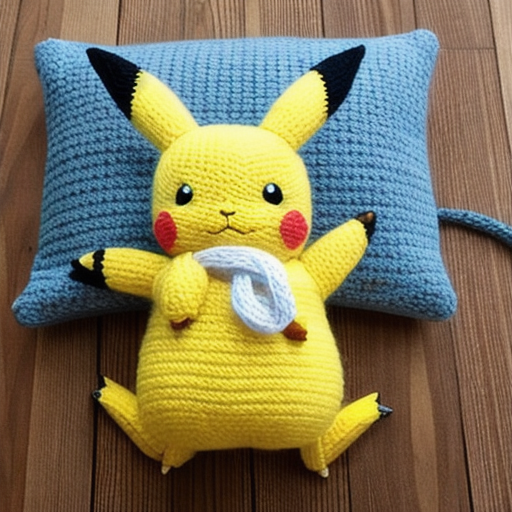
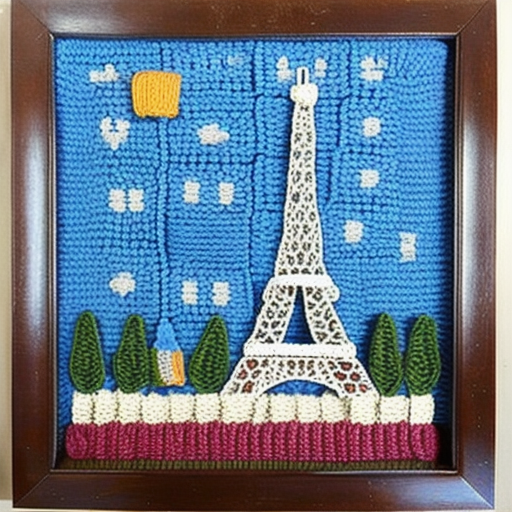
Using the public Yarn-Art dataset, LoRA produced:
- Pikachu in yarn-style
- Eiffel Tower rendered as yarn
For the travel client, the same pipeline generated:
- Realistic yet stylized destination previews
- Integrated into itineraries as visual journey previews
- Increased user engagement and bookings
Training Tips and Best Practices
Dataset Preparation
- Curate high-quality images (minimum 50-100 images for good results)
- Write descriptive captions that capture the style and content
- Maintain consistent image resolution (512x512 or 768x768)
- Balance your dataset across different subjects and compositions
Hyperparameter Tuning
- Learning Rate: Start with 1e-4, adjust based on loss curves
- LoRA Rank: Higher values (8-16) for complex styles, lower (4-8) for simple ones
- Training Steps: Monitor for overfitting, typically 1000-3000 steps
- Batch Size: Limited by GPU memory, 1-4 usually sufficient
Evaluation Metrics
- Visual Consistency: Generated images should maintain style coherence
- Prompt Adherence: New prompts should produce expected content
- Quality Assessment: Use FID scores or manual evaluation
- Business KPIs: Track engagement, conversions, user satisfaction
Installation and Setup
Requirements
pip install torch torchvision
pip install diffusers transformers accelerate
pip install peft
pip install pillow numpy tqdm pyyaml pandas
Hardware Requirements
- GPU: NVIDIA GPU with 8GB+ VRAM (RTX 3070 or better)
- RAM: 16GB+ system RAM
- Storage: 10GB+ for models and datasets
- Alternative: Use Google Colab Pro for cloud training
Environment Setup
# Clone or create project directory
mkdir lora_training_project
cd lora_training_project

# Create directory structure
mkdir -p data/yarn_art_export
mkdir -p training_data
mkdir -p output

# Set environment variables
export CUDA_VISIBLE_DEVICES=0  # Use first GPU
export PYTORCH_CUDA_ALLOC_CONF=max_split_size_mb:512
Conclusion
LoRA fine-tuning turns generic AI models into business-specific content engines.
For businesses, this means:
- Lightweight training on smaller datasets
- Customized styles & domains that align with brand identity
- Direct impact on engagement, conversions, and brand identity
- Cost-effective scaling compared to traditional fine-tuning methods
Next Steps
- Start small: Begin with 50-100 high-quality images in your target style
- Iterate rapidly: Train multiple versions with different hyperparameters
- Measure impact: Track business metrics like engagement and conversions
- Scale gradually: Expand dataset and refine based on results
- Integration: Build APIs or workflows to generate images on-demand
The combination of LoRA's efficiency with Stable Diffusion's power creates unprecedented opportunities for businesses to create personalized, on-brand AI-generated content at scale.
The author is the Founder of Shark AI Solutions which specializes at building production grade value added solutions using AI